
How to create a manual order for phone, WhatsApp, or in-store sales
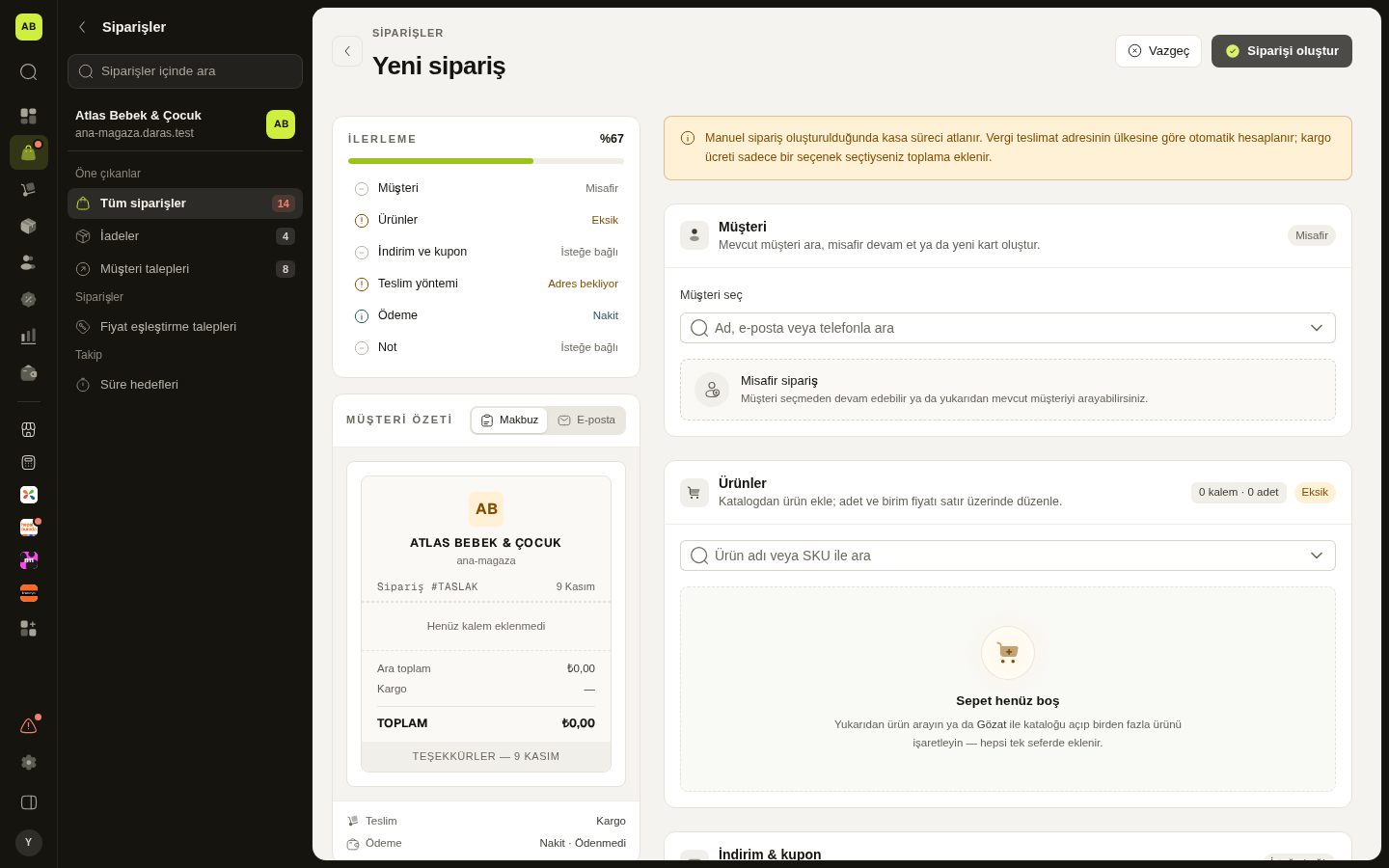
Use the Yeni sipariş (New order) screen to record sales made by phone, over WhatsApp, via social media, or in person without disrupting your inventory and accounting records.
Step-by-Step: Creating a Manual Order
- From the left menu, go to the Siparişler (Orders) page and click the Yeni sipariş button in the top-right corner.
- Under Kanal ve kaynak (Channel and source), select the channel where the order originated (for example, Telefon (Phone), WhatsApp, Instagram, Mağaza / POS (Store / POS), or Toptan (Wholesale)).
- From the search box on the Ürünler (Products) card, select the products or variants sold and set their quantities.
- In the Müşteri seç (Select customer) box in the right column, search for an existing customer or enter new customer details and a delivery address.
- To apply a discount, fill in the Kupon kodu (Coupon code) or Manuel indirim (Manual discount) field; if the customer has a wallet balance, apply the Mağaza kredisi (Store credit) amount.
- Select the Teslim yöntemi (Delivery method) (Standard Shipping, Store Pickup, Courier) and payment status (Ödendi / Havale / Kapıda Ödeme (Paid / Bank Transfer / Cash on Delivery)).
- Click the Siparişi oluştur (Create order) button in the top-right corner to complete the order (or save it to the Taslak siparişler (Draft orders) list if payment is pending).
Common Issues and Solutions
| Issue | Cause | Solution |
|---|---|---|
| Warning "Mağaza kredisi uygulanamadı" ("Could not apply store credit") appears | No customer has been selected on the order yet, or the entered amount exceeds the customer's available balance | First link the customer via the Müşteri seç field and make sure you do not exceed the available balance. |
| The product I searched for shows "Stokta yok" ("Out of stock") in the list | The product's primary warehouse stock has dropped to 0 | Update the product's stock quantity or add it using the "Stok dışı satışa izin ver" (Allow overselling) option. |
Tips
- For orders coming through WhatsApp, saving the order as a Taslak sipariş (Draft order) and sending a one-click 3D Secure payment link to the customer eliminates the collection risk of cash on delivery.