
How to add authorized seller certificates, warranty plans, digital licenses, and 3D/video media
In electronics, cosmetics, watches/jewelry, software, and luxury categories, the most important drivers that speed up a customer's purchase decision are authenticity trust, warranty coverage, and rich product media. In Daras, you can manage all of these features—from authorized seller certificates to digital license keys—directly from the catalog menu.
1. Uploading Authorized Seller Certificates and Product Certifications
- From the left menu, go to Ürünler → Yetkili satıcı belgeleri (Products → Authorized seller certificates) and click the Belge ekle (Add certificate) button.
- Select the relevant Marka (Brand), upload the distributor/manufacturer authorization PDF, and enter the Geçerlilik bitiş tarihi (Expiration date).
- Define certificate templates on Ürünler → Sertifikalar (Products → Certifications) for organic, vegan, CE, or ISO product credentials, and on Dijital orijinallik sertifikaları (Digital certificates of authenticity) for jewelry and collectibles.
2. Warranty Terms, Extended Warranty Plans, and Claims
- Define standard warranty coverage (e.g., 24-Month Official Distributor Warranty) on the Ürünler → Garantiler (Products → Warranties) page.
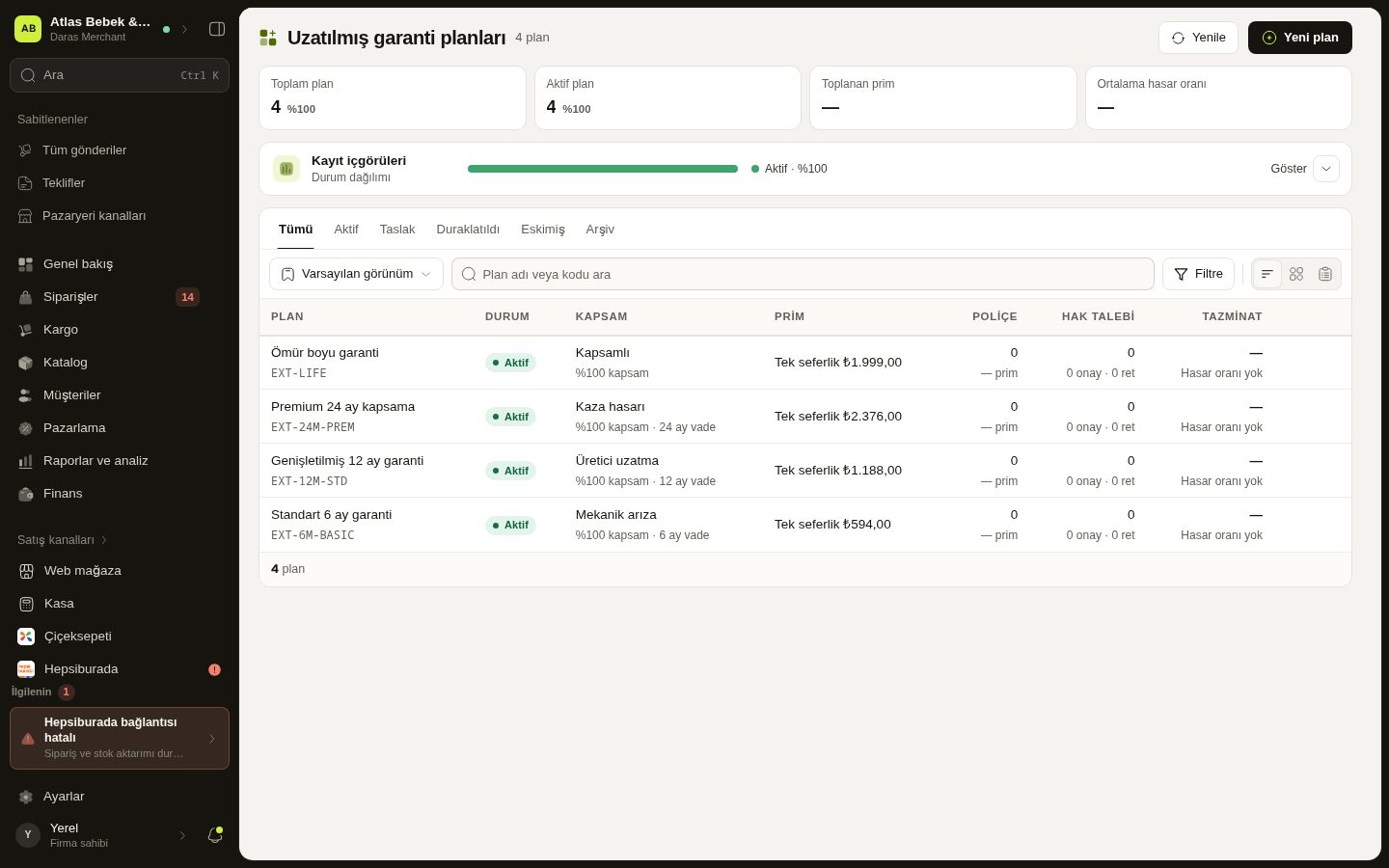
- To generate extra revenue in the cart, create a Yeni paket (New plan) on the Ek garanti paketleri (Extended warranty plans) page and set the duration (e.g., +1 Year) and price rate.
- Track malfunction/repair requests submitted by customers on the Garanti talepleri (Warranty claims) screen.
- When you approve, reject, or record a payout for a claim, an automatic email is sent to the customer; rejection emails include the reason you entered, and payout emails include the paid amount. You can customize the templates under the Sipariş ve kargo (Order and shipping) group on the Ayarlar → Müşteri e-postaları (Settings → Customer emails) screen.
3. Digital Licenses, Pre-Orders, and 3D / Video Media
- If you sell software activation codes or game keys, import a pool of license keys per product on the Ürünler → Dijital lisanslar (Products → Digital licenses) screen.
- To put upcoming items on sale before stock arrives, set an estimated ship date on the Ön siparişler (Pre-orders) page.
- To showcase your products up close, link
.glb/.usdzfiles or promotional videos to products on the Ürün videoları (Product videos) and 3B / AR modeller (3D / AR models) screens.
Common Issues and Solutions
| Issue | Cause | Solution |
|---|---|---|
| Digital license product appears as "Out of stock" | All available keys in the license pool have been sold | Upload new license keys to the product on the Dijital lisanslar (Digital licenses) page; stock count updates automatically. |
| Authorized seller badge did not appear on the storefront | The certificate has expired or the product is not linked to the corresponding brand | Update the certificate expiration date and make sure the Marka field is selected on the product card. |
| Warranty claim shows "Ödenen tutar, onaylanan tutardan muafiyet düşüldükten sonra kalan tutarı aşamaz" (Paid amount cannot exceed the remaining amount after deducting the deductible from the approved amount) warning | The payout owed to the customer is calculated by subtracting the warranty deductible from the approved amount | Enter a payout amount less than or equal to approved amount − deductible. Example: 600 TRY approved, 150 TRY deductible → maximum 450 TRY paid. |
| "Muafiyet, onaylanan tutarı aşamaz" (Deductible cannot exceed the approved amount) warning | The deductible entered while approving the claim is greater than the approved amount | Enter a deductible less than or equal to the approved amount; if left blank, the default deductible defined on the warranty applies. |
| "Ödeme, garantinin kalan karşılama tutarını aşamaz" (Payout cannot exceed the warranty's remaining coverage limit) warning | The warranty's remaining coverage balance is lower than the amount you are trying to pay | Enter a payout up to the remaining coverage limit; each payout is automatically deducted from the warranty's remaining balance. |
Tips
- An automatic reminder is sent to the dashboard notification center 15 days before your authorized seller certificate expires; renew your certificate on time to avoid marketplace listing restrictions.